
Introduction to full registration profiles
What we expect of fully registered teachers
To maintain your registration, you must:
- keep a reflective professional learning record
- every 5 years, confirm you have reflected against the professional standards and engaged in ongoing professional learning through Professional Update.
You should use MyGTCS for your reflective professional learning record, unless your employer advises otherwise. You can either:
- use each area of the full registration profile to record and reflect on different areas of your professional development
- keep your own record of your professional learning, and upload these as files in your profile when it comes to sharing with your PU reviewer
How you create or organise your reflective record is a matter of professional judgment for you. We do not require this record to be structured in any particular way.
Your employer may have expectations about the way you undertake and record your professional development. Some employers use an alternative platform altogether.
Your full registration profile
Tools that support Professional Review and Development (PRD)
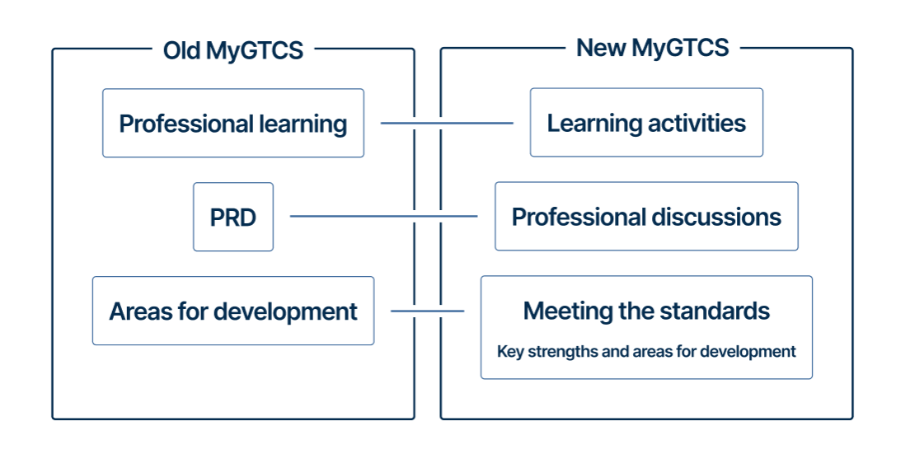
For teachers who previously logged professional development in MyPL, many of the areas of the new full registration profile will be familiar. The following areas may have been renamed and look different due to improvements but should be familiar tools that support PRD.
Learning activities
Professional learning is now recorded in the ‘Learning activities’ area. We recommend that you record only key professional learning activities that have had impact.
You should consider and record which aspects of the Standards have underpinned specific learning activities. This builds a picture of your learning over time, along with the specific aspects of the Standards you have been focused on.
We do not require you to detail every activity you participate in. What is more important to us is:
- your focus on self-evaluation and reflection
- what the impact of your learning on your professional development has been
Valuable professional learning includes a wide range of experiences: Professional learning examples
Professional discussions
PRD meeting records belong in the ‘Professional discussions’ area.
We have also expanded this area to allow you to record other meetings not related to PRD, for example, a meeting regarding your leadership development or professional dialogue with colleagues and peers.
Meeting the Standards
You can find and enter areas for development in the ‘Meeting the Standards’ area.
We have also added the functionality to record key strengths.
New and optional profile areas
We have introduced some additional areas to the full registration profile:
- Observations
- Development plans
- Teaching blocks – which you use to organise your records
We recommend you explore the dedicated areas for recording observations and development plans and choose whether to use them.
Observations
We do not require you to record observations, but you may choose to do so. This area allows you to note:
- the learning from any observation you have undertaken
- outcomes of any observations made by others of your teaching
You can record an activity explicitly described as an observation, for example where you visit another teacher’s lesson to observe a particular aspect of teaching.
You can also record less formal ‘observations’, where you have had exposure to a particular situation that you consider impactful in your own development.
Development plans
The new ‘Development plans’ area provides you with the option to create over-arching development plans which support your growth as a teacher.
After entering key strengths and areas for development following PRD discussions, you may wish to formulate a development plan. This could be a more detailed or overarching plan created using a school/college template and saved separately from the platform.
The ‘Development plans’ area now provides a home for these materials for those who wish to use it.
Teaching blocks: organising your records
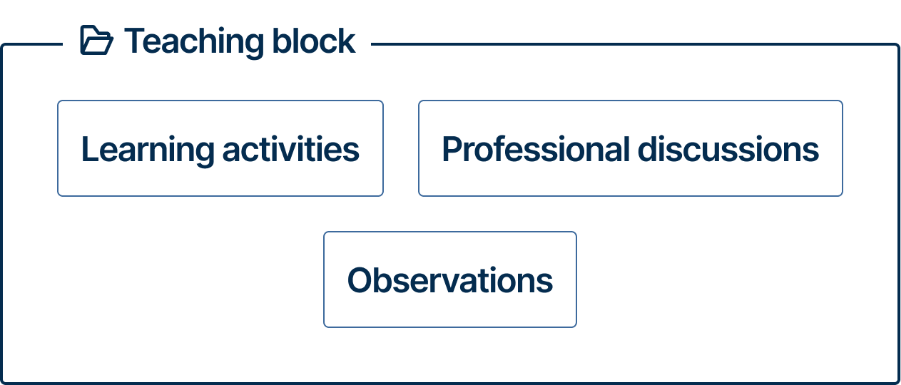
A teaching block is like a folder. It is an organiser for records of professional development over a set period, which you can determine. For example, this could be over an academic session. You may prefer to choose a shorter or longer period, for example a term or a 5-year PU cycle. If you work in more than one place, you can label blocks to distinguish between contexts.
You can title and date these teaching blocks to suit your circumstances.
Teaching blocks allow you to organise the following records under one folder:
- Learning activities
- Professional discussions
- Observations
Once you have organised records into a teaching block, you can make the records visible to your PU reviewer.
The ‘How to use your full registration profile’ guidance, found in the resources area of MyGTCS, goes into more detail on how add, edit and make teaching blocks visible to your PU reviewer.
Opportunities for reflection using the Professional Standards
Within each area of the profile, there are fields which prompt you to reflect on your practice and development. You also have the option to do this in a more holistic way using the ‘record, reflect and plan' fields within a teaching block.
Further guidance
You can find step-by-step technical instructions on how to use your full registration profile in the ‘Resources’ area of the MyGTCS platform. Including:
- How to use your full registration profile
- How to submit your Professional Update for sign-off